
How to calculate an expense markup
Written by Nutcache Team
Updated
When managing projects, expenses don’t just affect your internal costs — they also influence how much you bill your clients. By applying a markup on expenses, you can ensure that your pricing is both transparent and profitable.
What is an expense markup?
An expense markup is the difference between the purchase price (what your company pays) and the selling price (what you charge the client). In practice, this means you can add a selling price to any expense, which allows the system to calculate the markup automatically and reflect the billable amounts.
Purchase price → remains part of your cost-based budget, helping you keep track of internal spending.
Selling price → is applied to your billable amounts, ensuring the client is invoiced accurately.
Why use expense markups?
Expense markups give you a clear view of your profit margins on reimbursable costs. This dual tracking makes it easy to:
Understand how expenses impact your internal cost structure.
See how those same expenses translate into client invoices.
Ensure your projects remain profitable by making margins visible.
Why this matters
Using expense markups simplifies the way you handle reimbursable costs. With clearer margins, you can price expenses more confidently and maintain full visibility on how every purchase impacts both your budget and your client billing.
How to calculate an expense markup
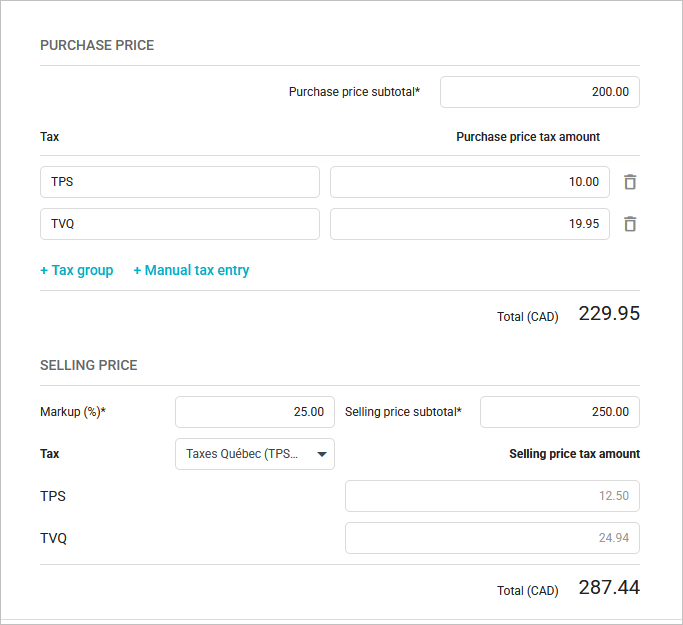
First, let's create a new expense from the Expenses module accessible from the left-hand menu. For demonstration purposes, let's enter the purchase price of the expense as $200.00.
1. Start with the purchase price.
Purchase price subtotal = 200.00 CAD
Taxes are applied:
TPS = 10.00
TVQ = 19.95
Total purchase price (with taxes) = 229.95 CAD
This represents your internal cost of the expense.
2. Apply the markup
Enter a 25% markup.
Selling price subtotal = 250.00 CAD
3. Add taxes to the selling price
Taxes applied on the selling subtotal:
TPS = 12.50
TVQ = 24.94
Total selling price (with taxes) = 287.44 CAD
4. Understanding the markup impact
Purchase price subtotal (cost basis) = 200.00 CAD
Selling price subtotal (billed to client) = 250.00 CAD
Markup (profit margin on the expense) = 50.00 CAD (25% of 200)
This way, the system shows both:
What the expense costs you internally (purchase price + taxes).
What the client sees on their invoice (selling price + taxes).
Need a hand?
Our team can help you find the answer.
Contact us